
This is off the usual theme of my blog posts, but I had this problem with my music library on my mac and I couldn’t find any solution online and Apple support didn’t quite know what to do either, so I wanted to document how I fixed it for others.
Background
The problem
The most immediate problem: ever since upgrading to macOS Big Sur, opening iTunes starts a background process “AMPArtworkAgent” which would run at high CPU usage in the background, not apparently doing anything at all. I tried leaving it running overnight, and it never stopped.
For more context: I have been having on and off problems with my music library since at least 2019. I would find duplicates of songs purchased from iTunes (one version in the cloud, one downloaded one), occasionally syncing my phone would cause playlists to duplicate, “playlist” and “playlist 1”, other things like that. I also found that genius had not been working for a while, but it’s hard to tell if that was related.
Note: that I am going to refer to the app on my mac as iTunes (even though it is called music) for clarity.
My setup
- Mid 2020 Macbook Air (Intel), 1TB SSD, macOS 11.2.3 Big Sur (current version)
- iPhone Xr 256 GB iOS 14.4.2 (current version)
- Music library:
- 9,950 songs, 59 GB
- Not subscribed to Apple Music
- iCloud music library off
- No iTunes Match
- Songs a mixture of imported mp3s and songs purchased from iTunes store
- “Keep music media folder organized” on
- No Apple Music subscription. I manage the music on my Mac and sync it to my phone by USB.
The solution
Step 1: Back everything up
- Run time machine backup
- Copy entire
/Users/iaizzi/Music/folder to an external hard drive - Export library metadata
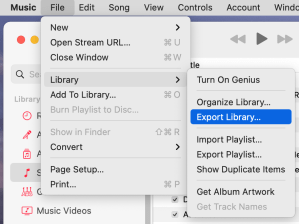
- File -> Library -> Export library…
- This includes all your playlists, play counts, other metadata, but not actual music (so the file is small)
- Save it somewhere outside your music library folder
Step 2: Create a new blank music library
You can have more than one library on a mac and you switch between them by holding option when you click to open iTunes.
- Quit iTunes, restart computer
- Hold option key and click on the iTunes logo
- You should see a dialog like the screenshot below. Select “Create library” to create a blank music library.
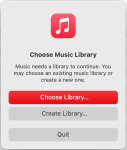
- Give it a useful name to distinguish from the library you already have, save it wherever you want, just not inside of the old iTunes library.
- Click okay to enter iTunes. You should now have a completely blank music library, crucially, the database for the library will be a new “Music” library, and not the old “iTunes” library.
- Before you do anything else, open Music -> Preferences:
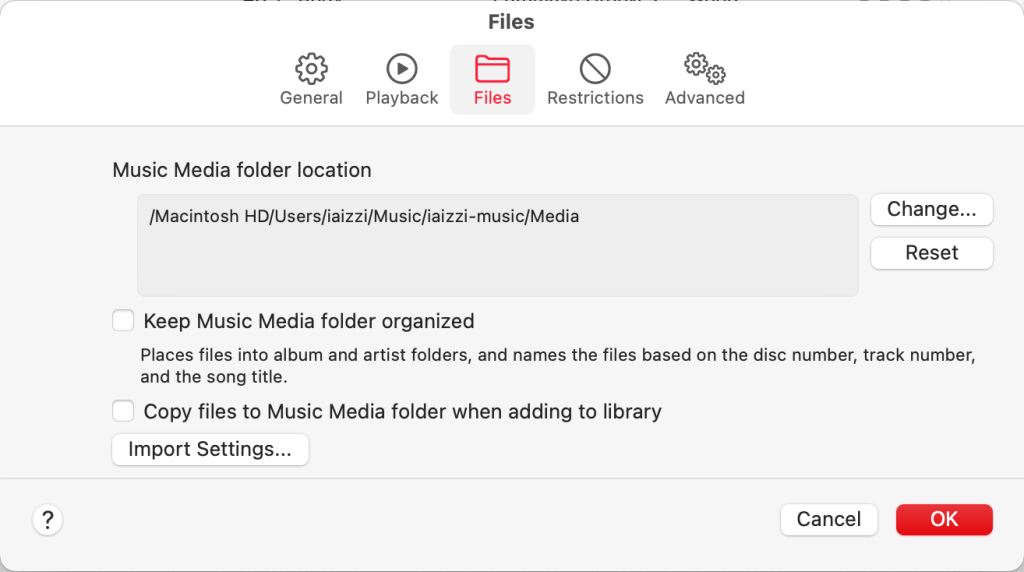
- In “Files” (see screenshot below)
- Confirm that the “Music Media folder location” is in the place you selected
- Uncheck “Keep music media folder organized”
- Uncheck “Copy files to Music Media folder when adding to library”
- In “Advanced”
- Uncheck “automatically update artwork”
- In “Files” (see screenshot below)
- iTunes may already be signed into your store account, so you may see the your purchased songs in the library, but not playlists, or any other data you have added.
- It may run “fetching artist artwork” or something like that. That is a separate process from the album artwork issue.
- Let iTunes run until it’s done with any checks, downloads, etc
Step 3: Reimport your music
Here’s where things get weird/touchy. I know this exact order of doing things worked, I can’t make any guarantees about trying these steps out of order.
- Reboot computer
- Open iTunes, confirm in settings that you are still pointed to the correct music library.
- Your new music media file should still be small, only whatever purchases you have downloaded there.
- Import your old library metadata using File -> Library -> Import playlist… and select the XML file you exported in step 1.
- This should import all your playlists, and all of your songs should appear too with the correct metadata.
- You may get an error “some of the songs in the file not imported because the files could not be found” you might want to save the list it provides, but I don’t believe this is an actual problem (these are probably weird wrong listings that were in the old library).
- Right now, the files for your songs are still in the old library location.
- But your library (in Preferences -> Files) should still be pointing to the new location you set.
- Importing the library may take only a few minutes, but iTunes may run some other processes like “determining gapless playback information,” let all these run completely.
- Check that you have the same number of songs and that you can play both purchased and non-purchased music.
Step 4: Copy the music files over
- Once you’re done with step 3, reboot your computer and reopen iTunes
- Now it’s time to copy the actual music files into your new library.
- Go to “File -> Library -> Organize Library… ” and check “consolidate files” in the dialog and click okay
- This may take a little while as it copies (not moves) the files from your old iTunes folder to the new music library.
- Give it time to run and do any other processing
- After this is complete, check that you can still play your music files.
- Check that the songs files themselves are located in the new music library:
- Right click on a song -> Get info
- Select the “File” tab
- Location should list a location in the new music folder you selected (the path should not include “iTunes”)
- This may not show anything for undownloaded purchases
- You should check a few songs this way to confirm they have moved.
- Check that your new music folder is now taking up more storage space (probably to match the size of your libary listed in iTunes)
Step 5: Sync with your phone
I waited to do this until I was sure I had fixed everything else up. Since it was a new music library, it will want to remove all the music from your phone and start fresh. This seems to work fin and I was able to make changes on the mac and have them appear on the phone and vice versa.
Step 6: Cleanup
I’ve been slowly turning on the remaining services and I think everything is working.
- Ran “Get album artwork” manually. Seems to work fine.
- Re-enabled genius
- Still haven’t tried cleaning up my old library, so right now I still have the original library taking up space in another directory.
- I’ve been able to add music to the library and run “consolidate library” with no problems. Not seeing duplicates.
Notes
Attempted fixes (that didn’t work)
- Restarting in safe mode
- Resetting NVRAM, SMC
- Start iTunes while holding shift/option
- Deleting album artwork file from music library (notably, none of the files in the album artwork file had been updated in a long time)
- Toggling Preferences -> Advanced -> Automatically update artwork on and off
- Resetting store cache
- Running “consolidate files”
- Manually running “Get Album Artwork”
Cautions about this approach
- Need enough space to have two copies of your music library.
- I had to try this twice, the first time the new library somehow reverted back to the old media files location and I had to delete the new library and start again. I suspect (but have not tested) that my first attempt at a new library got messed up when I opened the old library and then returned to the new library.
- You will need to reauthorize computer to play purchased songs
- I’ve had a bit of trouble with having to reauthorize purchased songs. Not sure what the deal with that is, but it may go away.
- “Date added” metadata not saved
- The old iTunes library may still have your podcasts, TV shows, movies, etc in it, so I’m not sure if you can delete it safely.
- I don’t have the exact same number of songs as before, but the difference is less than 5 songs, so I think it might be some weird technicality about whether voice memos count as songs or something.
- My library is much smaller than it was before 78 GB -> 60 GB. I think the previous number included podcasts and movies which haven’t been moved to the new library, but I’m not sure.
Speculations on the origin of the problem
This problem became acute when I upgraded to macOS Big Sur, but I think the origin of the problem is a bit older. I have done a couple Apple Music (subscription service) trials over the years, and I think the last time I did use the “iCloud Music Library” service (or something like that). I think turning that off might have caused some weird problems in my music library database that festered over the years. After I turned off the subsciptions, I remember having a very stubborn problem with syncing my iPhone. I kept getting duplicate playlists and other errors. It took multiple attempts to totally clear the music off my phone and sync it as a new phone.
The changeover from iTunes to “Music” on the mac might have introduced some weirdness as well, especially because my library was converted to the new format, but the media files themselves remained in the same place. I attempted to alleviate some of these problems over the summer by setting up my new computer as a new machine rather than restoring from a backup of my old computer.
Closing thoughts
I want to commend all the individual Apple tech support representatives I spoke with over text and over the phone. They were all patient and listened carefully to understand my problem. I am less pleased with the overall system they were working within. I ended up speaking to six different people before I was escalated to the senior advisor (Donald, who was great!). The problem is that when chatting, there is no way to reconnect to the same person when your session gets disconnected, even if it gets disconnected because you had to reboot your computer. That was compounded by the link to reconnect to the service connecting me to the wrong department.
Finally, I want to lodge a complaint about Apple’s naming scheme for their apps and other trademarks. Apple really likes to call their apps by common nouns, (Music, Pages, Numbers, Notes, Messages, etc). I understand the appeal of this scheme, but it has made it nearly impossible to find help for these products. iTunes was a great name, and it was even better when the Apple Music service was introduced, since it distinguished the app from the service. It was almost impossible to search for help specific to this app, because most of the results end up being about the service Apple Music. I had to search for iTunes to get useful results even though that is the wrong name. It’s even hard to distinguish them when you’re talking to someone “I am having a problem with Music on my mac, no I don’t have Apple Music on my mac.”
 Adam Iaizzi, PhD (易亞丹)
Very helpful, Adam…thank you! I had an issue that wasn’t quite the same, but following your steps with the library file seems to have fixed it.
LikeLike
I’m glad it was helpful to someone! How did you come across my post?
LikeLike
Sorry for the delay in responding. I just did a google search. I do sometimes have latency issues that seem to either corrupt files or cause me to act incorrectly (thinking that I’m not getting the desired response, when actually it is still coming). Anyway, thanks again!
LikeLike
PLease do not delete your post, very useful
LikeLike
Thanks!
LikeLike
This seems to fix the problems. But one thing i lost (And i went back to my original setup) is the column setup on every playlist (in Songs View): I had all my columns as i wanted (Title, Artist, Group, etc.) and after your fix, all are default.
LikeLiked by 1 person
I think I lost that as well. I’m not sure if there is a way to save it. Another thing I lost was the “date added” for all my songs.
LikeLike
Thank you Adam. I read your excellent article just to gain some insight into dealing with the Music app.
LikeLiked by 1 person
Thanks Jon!
LikeLike
Thanks for the workaround, I have just migrated my collection to a M1 Mac Mini and never experienced this issue before! My library started off in iTunes years ago and has progressed through various version of Music. Its a shame AMPLibraryAgent doesn’t tell you which song it’s got stuck on. Very strange that consolidating to a new folder fixes it, but either way I’m grateful I’m not seeing my cpu constantly at 100% anymore!! Appreciated
LikeLiked by 1 person
You’re welcome! I’m so glad this was helpful for someone else.
LikeLike
Worked for me. Thank you kind sir. This has been an absolute lifesaver. Cheers!
LikeLiked by 1 person
Thank you for the kind words! After all the frustration I endured I’m glad to know this helped someone else.
LikeLike
I apreciate your post, very useful in any case… and I agree strongly with your arguments about naming scheme.
LikeLiked by 1 person
Thanks!
LikeLike
Forgive me if this has posted 3 separate times — I can’t see my comment when I press ‘comment’.
Hello, Adam
I have contacted Apple several times in the past year with 2 separate problems (though one actually resolved somehow, they both appear to stem from the same issue). And as you noted, the reps at Apple have been courteous and willing to help — they just can’t, for whatever reason.Your post has given me hope, but I must confess that it I’m a bit wary that it was made back in 2021 and that the latest comment is from almost exactly one year ago. I intend to give this a shot but am worried that I’ll lose everything! I have just over 20,000 songs saved (perhaps a third are uploaded ROIO) and I do NOT want to try to recreate the library I’ve been working on for more than a decade.
Two questions: Do you have any idea whether this solution is still valid in 2024?The second is – if I follow your directions entirely, is there a chance I’ll lose everything? I am not asking for a guarantee here — I’m pretty savvy when it comes to digital technology — but if even the tiniest part of a step is missing, I’m afraid I don’t know enough to compensate.
As for my specific problem — it really only applies to album artwork. Yes, that seemingly insignificant feature is driving me crazy. I won’t go into a lot of detail, but changes that I make on my Mac Air do not show up on my Android Apple Music App. In fact, if I create a custom album with several different examples of artwork, only the artwork for the very first song appears (for EVERY song). Today, to make matters even more confusing, I changed the artwork for song #2 and now that artwork is showing for every song.
I cannot figure it out, nor can anyone at Apple. Your solution, even though it has nothing to do with album artwork, seems to be the only viable solution. Essentially, it seems to be a case of ‘starting over’ and then bringing back all of your music as if it were the first time.
So that’s it. I hope you’re still around these parts and can shed some wisdom on a baffling issue.
Thank you,
Michael Aderhold
LikeLike
I haven’t had to redo this procedure since I wrote the post, so the honest answer is that I’m not sure if it will still work. If you take steps to make full back ups of your current your music library though, that should be pretty safe. The fact that you can hold options when starting the music app on the desktop and choose from different libraries gives you that option.
From your comment I can’t tell if you have the Apple Music streaming service, I don’t know how this would interact with that if you have it.
LikeLike
Thank you. I do subscribe to Apple Music, and given the other comments re: success, surely at least one other person does as well(?)
I may hold off for now in hope of a new update that might resolve what admittedly is more annoying than a real problem.
LikeLike